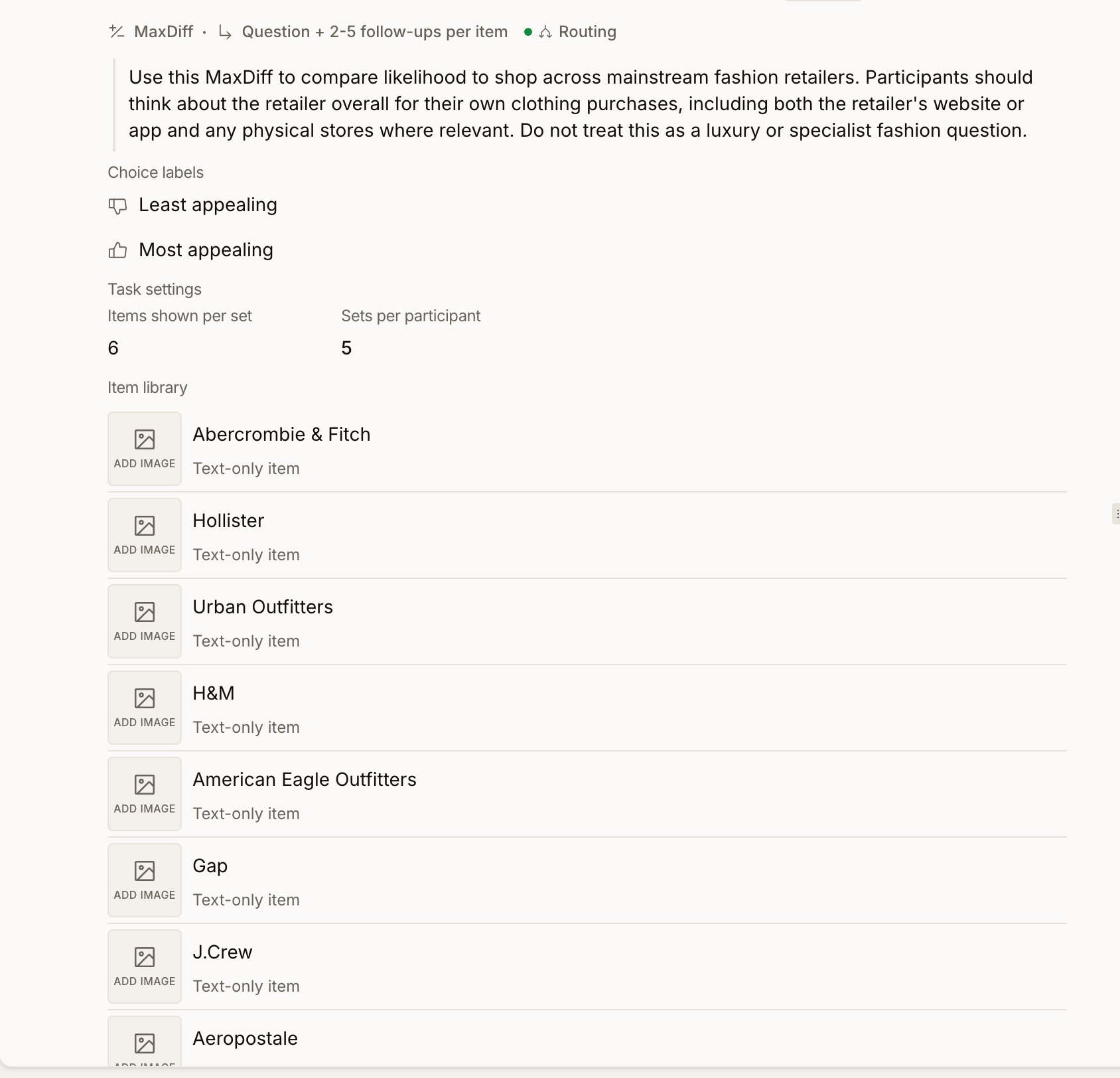
MaxDiff (Maximum Difference Scaling, a.k.a. best-worst scaling) ranks a list of items — concepts, features, claims, benefits, messages — by how strongly participants prefer them. Instead of rating each item on a Likert scale, participants pick the most and least appealing item from small sets of items. Because MaxDiff in Conveo runs inside a conversational interview, the AI moderator also probes participants about why they ranked items the way they did. You get the preference ranking and the reasoning behind it, from the same participants, in one study.
MaxDiff fits well when you have 6–30 items to rank and direct importance ratings would all come back as “important.” Use it for messaging testing, feature prioritization, concept screening, claim selection, and benefit laddering.

Key concepts

Item — one of the things being ranked. Text, or text + image. Set (also task or screen) — a small group of items shown together. The participant picks the most and least appealing item from the set. Items per set — 3–7 items, default 4. Sets per participant — auto-derived so each item appears ~3 times per respondent. That’s the lower end of the industry-standard 3–5 exposure range (Orme 2005; Sawtooth Software 2020). Choice labels — the two button labels. Defaults: Most appealing / Least appealing. Rename to fit your construct (Most likely to buy / Least likely to buy, Most important / Least important, etc.). Preference share — the primary output. Reads as “if a respondent had to choose between all items, how often would they pick this one.” Sums to ~100% across the item pool.

Setting up a MaxDiff question

Add the question via the AI design assistant (“add a MaxDiff question to rank these 12 features”) or by switching an existing question’s type to MaxDiff. Add items in the item library — one at a time, optionally with an image. Keep labels short, parallel in form, and comparable in scope. 8–20 items is the sweet spot. Configure task settings. Items shown per set is 3–7 (default 4); smaller sets are lighter per screen but take more screens, larger sets pack more information per selection. Sets per participant is computed automatically from item count and set size (roughly ceil(3 × items / set size)). Set choice labels directly under the question text. Good labels are symmetric (Most likely to buy / Least likely to buy, not Would buy / Wouldn’t buy), specific to your construct, and short enough to read on a button. Translations. If your study runs in multiple languages, click Translations above the item library to translate each item. Missing translations fall back to the default label.

Probing settings

Click Probing settings above the question to set up the follow-up conversation. MaxDiff probing always targets three items per participant:
  1. Their top-ranked item
  2. Their bottom-ranked item
  3. One middle-ranked item, picked to balance qualitative coverage across the study
The inquisitiveness selector on a MaxDiff question is read in follow-ups per item — raising it probes each target more deeply, rather than adding a fourth target. Middle-item coverage becomes meaningful after ~5 prior participants; best and worst probing run from interview 1.

Participant experience

Participants see one set at a time with a Most appealing and Least appealing button next to each item. They advance through all sets, then the AI moderator asks them to explain their top pick, their bottom pick, and one middle item. Sets are composed adaptively for each participant to balance item exposure, item pairings, and display positions — so the estimator can cleanly separate item effects and no item is under-shown.

Analysis

MaxDiff analysis lives on the Question Coding page. Three preset views are available:
  • Preference share — the primary Bayesian output. Each item’s share of preference on a 0–100 scale; reads as “how often would a respondent pick this item as best if they had to choose between all items.” Requires at least 10 completed interviews.
  • Utility scores — zero-centered hierarchical-Bayes utilities on the Sawtooth-style diff scale (average |utility| = 100). 0 is the average item; positive means above-average preference, negative below. Utilities are on a log scale, so gaps between items reflect the magnitude of preference, not just the order. Also requires 10 completed interviews.
  • Best vs worst picks — counting baseline: raw best and worst pick rates and net %. Available from the first completed response and serves as an independent sanity check on the Bayesian output.
Preference share and Utility scores show the same underlying hierarchical-Bayes fit in two complementary ways: share is easier to talk about with stakeholders; utilities are better for spotting big magnitude gaps that flatten in share space. If the Bayesian view and the counts view disagree sharply on a dataset with plenty of completes, that’s a signal worth investigating. Analyses recompute asynchronously as interviews complete. Saved filter sets for segment analysis run their own subset refits.

Per-item metrics

Across the three preset views, Conveo reports the following for each item:
MetricMeaning
RankRank by hierarchical-Bayes mean utility (1 = most preferred)
Preference share (%)Softmax-based share; sums to ~100% across items
Utility scoreZero-centered diff utility (Sawtooth-style); 0 = average item
Best %Share of times this item was picked as most appealing out of times shown
Worst %Share of times this item was picked as least appealing out of times shown
Net %(Best count − Worst count) / Times shown
Times shownRaw exposure count across all participants
Preference share is the primary metric — proportional, interpretable, and stable across item-set changes. Use utility scores when you need to reason about magnitude (e.g. “item A is meaningfully stronger than item B”). Net % is a good check when HB isn’t available yet.

Per-respondent utilities

For each participant, Conveo persists a posterior mean utility per item. These feed segment refits, the per-interview drill-down (each respondent’s implied ranking alongside their qualitative probes), and downstream segmentation or persona work without re-running the fit. Participants who completed only a few sets are shrunk more strongly toward the population mean — a direct property of the hierarchy.

Statistical methodology

Likelihood. Each set is modeled as two conditional multinomial-logit choices: the participant first picks the best item, then picks the worst from the remaining items using a sign-flipped utility. A single latent utility per respondent per item explains both selections — the standard best-worst scaling likelihood used by the established commercial and open-source MaxDiff engines. Hierarchy. Respondent utilities are drawn from a multivariate-normal population distribution estimated jointly with the respondent-level utilities. This gives MaxDiff its key property — partial pooling: respondents with many sets inform their own estimates strongly; respondents with few are shrunk toward the population mean. The hierarchy also lets segment refits produce sensible outputs on modest subsets. Priors are weakly informative, so the posterior is dominated by the data. Sampler. The model is fit with Hamiltonian Monte Carlo via Stan, the mainstream tool for Bayesian hierarchical models and the same engine used by the leading commercial MaxDiff platforms. Fits run asynchronously and are cached until new interviews materially change the dataset. Diagnostics. Every fit is checked against the standard Bayesian convergence diagnostics — R-hat, effective sample size, and divergent-transition rate — at current best-practice thresholds (Vehtari et al. 2021). A fit only reaches the UI if those checks pass. Robustness. If the first attempt misses a diagnostic threshold, the engine automatically re-runs with more robust sampler settings. As a final tier, Conveo falls back to a simplified hierarchical model that still estimates respondent-level utilities and population means but not inter-item correlations. When used, the analysis card surfaces a Simplified model used notice. The output is still hierarchical Bayes, not counts. Preference share. Preference share is computed in the bias-free way — integrating softmax across posterior draws and respondents — rather than applying softmax to point estimates. The naive “plug-in” approach is biased by Jensen’s inequality and systematically overstates the top of the ranking.
Want deeper detail on priors, diagnostic thresholds, sampler configuration, or the retry ladder? Reach out at support@conveo.ai — we’re happy to walk methodologists through the implementation.

Practical guidance

Sample size

  • 10 interviews — minimum for hierarchical Bayes output; below that, counts display only
  • ~50 interviews — typical point where rankings stabilize on 10–15 items
  • 100+ interviews — recommended for 20+ items and for any segmentation (each saved filter set refits separately, so every segment needs its own sample)

Item count

  • 6–10 items — fast, low-fatigue; best for short-listing
  • 10–20 items — the sweet spot for most studies
  • 20–30 items — viable but interview length grows; pilot first
  • 30+ items — reach out to support before fielding

Writing items

Items should be parallel in form (all noun phrases, or all verb phrases), comparable in scope (don’t mix “Affordable pricing” with “10% launch discount in March”), and free of obviously dominant options that every respondent will pick as best. Keep labels short so the set layout stays scannable on mobile.

When MaxDiff isn’t the right fit

  • Items aren’t comparable on a single dimension
  • You only have 3–5 items to rank — direct ranking is simpler
  • You need absolute importance on an external scale — MaxDiff ranks items against each other, not against an outside benchmark
  • You want multi-attribute trade-offs — that’s conjoint, not MaxDiff

Integrations

MaxDiff results flow into Question Coding (both preset views), Talk to Your Data (ask natural-language questions across rankings and probe responses), saved filter sets (segment refits), and per-interview detail views (each respondent’s implied ranking alongside their qualitative probes).
Anything missing? Let us know at support@conveo.ai and we’ll help you out!