


Ask Claude or any AI assistant about your Conveo studies
Connect your AI assistant to Conveo through MCP, then query your interview data and run Conveo's analysis without leaving the chat.
 Adriaan Slechten
At a glance
- Connect Claude or any AI assistant to Conveo through MCP
- Sign in to Conveo securely with OAuth 2.1
- Ask about a study and get the answer from your interview data
- Run Talk to Your Data analysis tools inside the chat
- Open to every Conveo user since April 16, 2026
More researchers now write briefs, plans and summaries inside an AI assistant like Claude, while the evidence sits in their Conveo studies. So every question about the interviews meant switching tabs, finding the right quotes and pasting them back into the chat. Since April 16, 2026, every Conveo user can connect an AI assistant to Conveo through MCP, the open standard that lets AI assistants use outside tools, and ask about their studies right where they are working.
A silent walkthrough, from the first question in the assistant to an answer built from real video conversations.
How it works
Connect once. Add Conveo to your AI assistant as an MCP connection and sign in with your Conveo account. The connection is secured with OAuth 2.1.
Ask about your study. Type a question such as "What did participants say about pricing in my latest study?" and the assistant pulls the answer from your Conveo interview data.
Run Conveo's analysis in the chat. The assistant can use the Talk to Your Data analysis tools, and later additions such as facets, templates and topic guides.
Stay in your flow. The findings land in the conversation you were already having, next to the draft or plan you are writing.
Add Conveo to ChatGPT
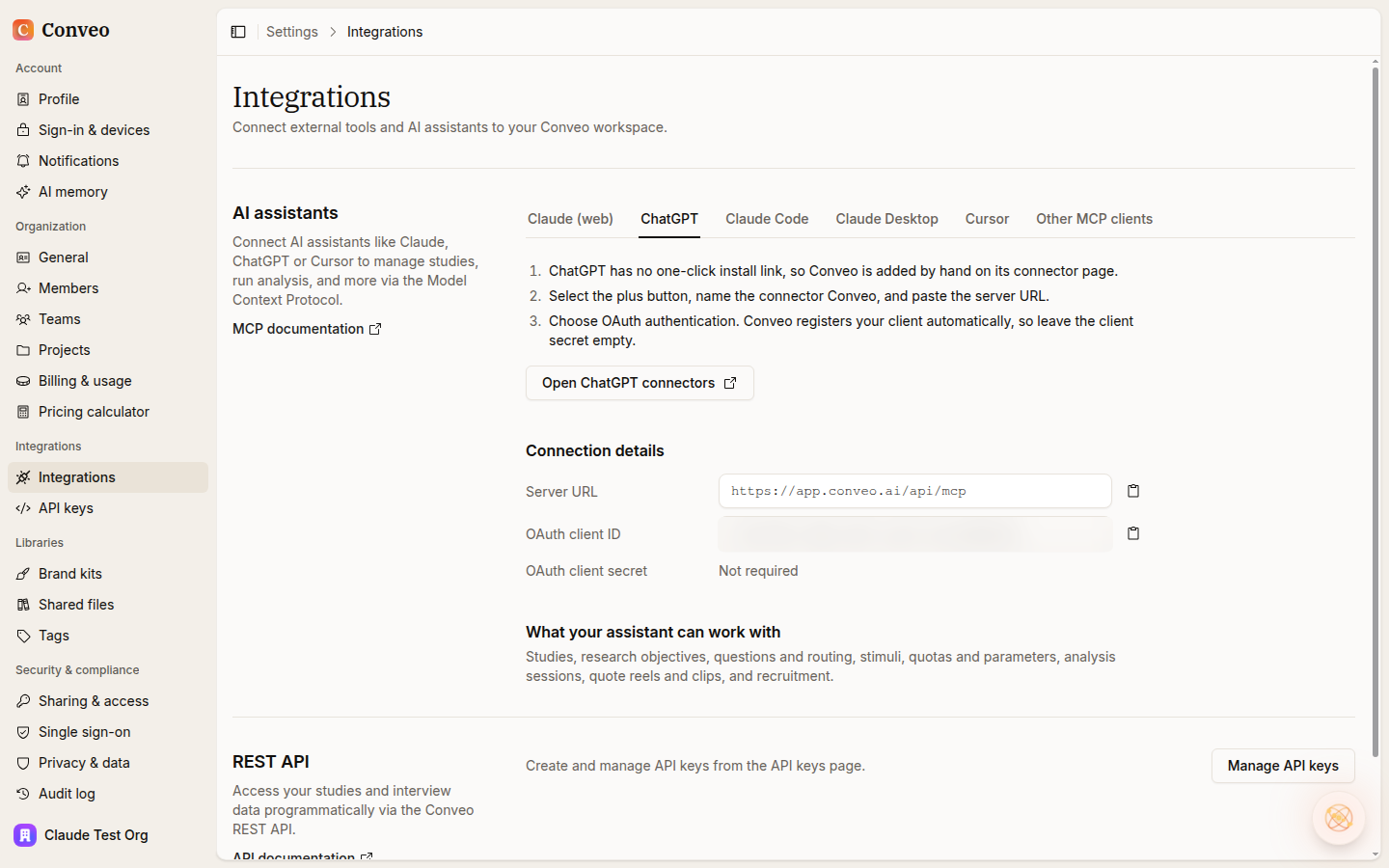
ChatGPT now sits next to Claude in Settings > Integrations. The AI assistants section has a ChatGPT tab beside Claude (web), Claude Code, Claude Desktop and Cursor, plus a tab for other MCP clients.
Open the ChatGPT tab. It lists the steps and the connection details you need.
Add Conveo by hand. ChatGPT has no one-click install link, so open its connectors page, select the plus button, name the connector Conveo and paste the server URL.
Choose OAuth. Conveo registers your client automatically, so leave the client secret empty.
Research teams asked for it in four situations
These come from teams in consumer electronics retail, software, apparel, grocery retail and beverages. We kept them anonymous.
Mix interviews with other research. Bring Conveo interviews into the same assistant conversation as the team's other qualitative sources.
Use the assistant they already have. Teams asked whether Conveo had an MCP connection ready for the AI workspace they work in every day.
Pull together what is known on a topic. Ask what earlier research said about a theme before planning the next study.
Keep colleagues on the right data. Teams want people who ask an AI assistant about customers to get answers from the research that came out of Conveo.
What this means for your research
Your video conversations become a source your AI assistant can work from directly, so the evidence travels to the place where decisions get written up. You ask in plain language, the answer comes from your Conveo data, and the interviews stay in Conveo for you to check.
One thing to plan for: many companies allow only approved AI assistants, so check with your IT team which assistant you can connect.
Read the MCP guide to connect your assistant.