
Record the phone screen while participants talk you through a task
Allow mobile in a screen-sharing study and participants share their phone screen from the Conveo app, recorded beside their camera like a desktop interview.
 Bernd Schrooten
At a glance
- Allow desktop, mobile (Conveo app, in beta on iOS 18+ and Android 7+), or both
- The phone screen and the camera play side by side in the recording
- The AI research assistant sees the screen and asks follow-ups about it
- People on a device you did not allow are asked to switch, or screened out
- Filter interviews by device type and device OS
Most people meet your app, your checkout or your booking flow on a phone. Until now, screen sharing in a Conveo interview meant a desktop browser, so a mobile journey had to be acted out on a laptop or described from memory. Screen-sharing studies now run on phones too: participants take the interview in the Conveo app and share their phone screen while they talk you through what they are doing.
How it works
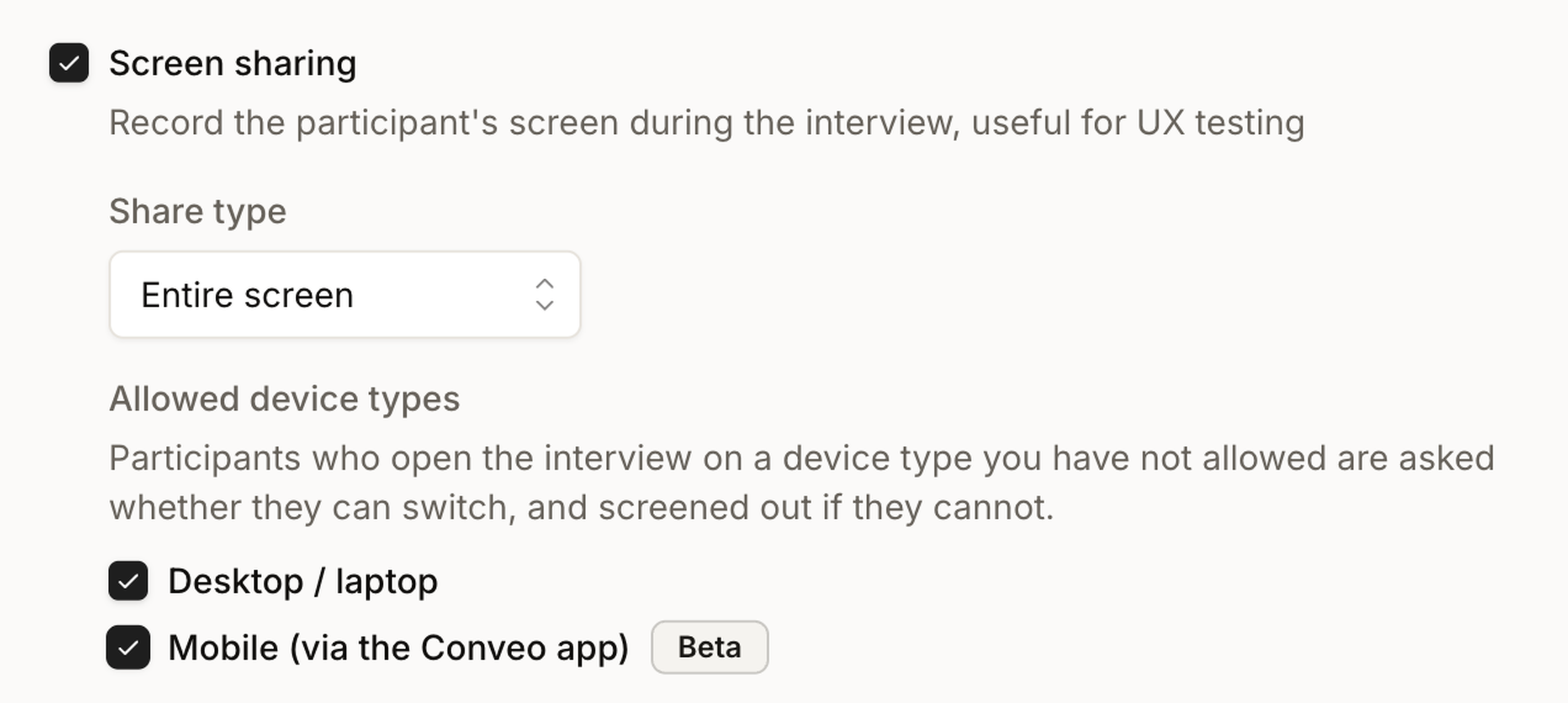
Choose the devices. In Advanced settings, under Recording, turn on Screen sharing. Under Allowed device types, tick Desktop / laptop, Mobile (via the Conveo app), or both. A new screen-sharing study starts with desktop only. Mobile is in beta, and tablets count as mobile.
Participants on a phone use the Conveo app. The interview link takes them to the app on iPhone (iOS 18 or later) or Android (7 or later), with a prompt to install it if they don't have it yet. They tap Share my screen and confirm the phone's own screen-recording prompt.
The recording shows the phone and the person. The phone screen plays on the left and the camera on the right, the same layout as a desktop screen-sharing interview. The AI research assistant sees the phone screen as they work through your task and asks follow-up questions about what they do on it.
People on the wrong device are asked to switch. Someone who opens a mobile-only study on a laptop sees "This interview needs to be taken on a phone" and a QR code to carry on in the app. Anyone who cannot switch is screened out, and the same works the other way round for desktop-only studies.
Every interview records the device it ran on
Each interview carries two attributes, Participant device type (Mobile or Desktop) and Participant device OS (such as iOS), so you can filter, compare iOS with Android, or drill into the mobile sessions of a mixed study.
Research teams asked for it in five situations
These come from sales and customer conversations with teams in gaming, betting, streaming, travel, payments, retail, media, consumer tech and refurbished electronics, and with research agencies. We kept them anonymous.
Mobile app tasks. Watch someone sign up, search or check out in the app they already use, and hear why they tap where they tap.
Prototypes at phone size. Open a mobile prototype on the phone and talk it through, instead of squeezing it into a desktop browser.
Shopping and booking journeys. Product search, comparison and checkout on the device where most of these journeys start.
Studies that used a separate mobile testing tool. Keep the mobile task and the conversation about it in the same video conversation.
Mobile-first panels. When most of your participants answer on a phone anyway, let them stay on it.
What this means for your research
You can test the mobile experience on the device it was built for, with the screen and the person's reactions in one recording, and keep mobile and desktop sessions apart when they need different tasks.
Three limits to know. Mobile is in beta: it is ready for client studies and we are still improving it, and recording quality can drop on lower-end phones. A phone shares its whole screen, even when the study asks for a single window, so anything on the screen while sharing is on can be recorded: ask participants to close private content before they start. And picking single questions or sections for screen sharing is a desktop setting; in the Conveo app the screen is recorded for the whole interview.
Mobile screen sharing has been on for every Conveo organization since October 6, in beta.
Watch Bernd set it up
Bernd Schrooten from our engineering team allows mobile in a study, runs a headphone search on his phone as a participant, shows the device attributes on the interview and then what happens when someone opens a mobile-only study on a laptop. Read the recording settings guide and what participants see on a phone.