In this article
TL;DR
Qualitative coding software helps researchers make sense of unstructured data by applying codes to passages and grouping them into themes.
Traditional CAQDAS suits researchers who want full control, AI-assisted tools speed up the first round of coding, and end-to-end platforms run the whole study and keep findings searchable across studies.
Before you buy, check security certifications, whether themes link back to their source, whether teams can share one codebook and how well the tool handles other languages.
AI coding is reliable for the first round, as long as researchers can review every code and see the evidence behind it.
Enterprise insights teams running research across studies and markets should consider end-to-end options like Conveo, which keeps every study in one place and links each theme to its clip.
Many comparisons of qualitative coding software are written for students and academics, so they focus on price and how easy a tool is to learn. They rarely cover whether a tool will pass security review or keep findings comparable across studies, both of which a research team at a large company has to check.
This guide is for research operations managers and insights leads looking for a new coding tool for qualitative methods. It explains the three types of software and what to ask before you buy, with an overview of 10 popular coding solutions. You’ll come away with everything you need to build a shortlist for your team.
What qualitative coding software does (and what it doesn't)
Qualitative coding software, also called qualitative data analysis (QDA) software or CAQDAS, helps researchers organize and make sense of unstructured data such as interview transcripts and open-ended survey answers.
Researchers use qualitative data coding software to:
Bring research documents into one workspace
Apply codes to the passages that relate to their research questions
Create, merge, and rename codes quickly, and keep a codebook of their definitions so codes are applied the same way as the analysis develops
Group related codes into themes that show patterns across interviews and responses
Generate visualizations and maps to help explore findings and relationships
Run advanced queries that analyze intersections between themes and demographics
Write notes that record observations and explain decisions made during the analysis
Export coded data and summaries into reports to share with stakeholders
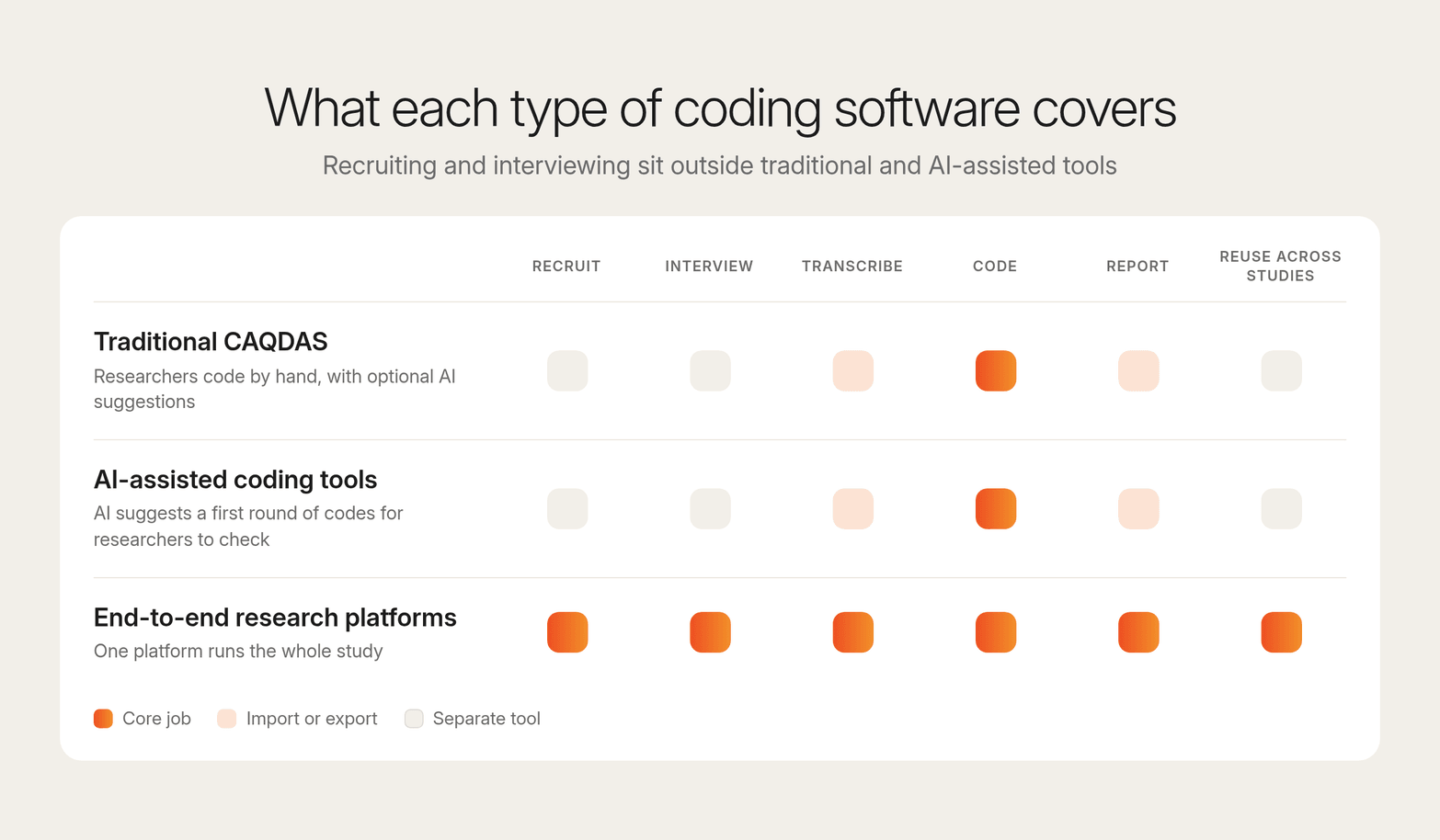
Traditional qualitative coding tools focus only on these jobs. The researcher codes each transcript, by hand or with optional AI suggestions, and recruiting and interviewing happen in separate tools. Newer tools take on more of that work. Some use AI to apply a first round of codes for researchers to check, and others run the whole study and keep findings searchable from one study to the next.
The 3 types of qualitative coding software
Before researching specific qualitative analysis tools, it’s good to have an idea of the types available, the differences between them, and how well they’d suit your team and workflows. Here’s an overview:
| Type | How it works | Choose it if | Trade-offs | Example tools |
|---|---|---|---|---|
| Traditional CAQDAS | Researchers import transcripts and other text data and code them by hand or with optional AI suggestions. Each study is saved as its own project file. | Your team runs a handful of studies a year and wants full control over every coding decision, or runs mixed methods research that combines qualitative and quantitative data. | Licenses and training add up, recruiting and interviewing happen in separate tools, and findings don’t carry over from one project to the next. | NVivo, MAXQDA, ATLAS.ti, Dedoose |
| AI-assisted coding tools | AI reads the transcripts and suggests themes and a first round of codes. Researchers check, correct and finalize them. | Interview volume is growing and coding is slowing your team down, but researchers still want to review every code. | Researchers still have to check the AI’s work, and recruiting and interviewing happen in separate tools. | Marvin, Delve, Dovetail |
| End-to-end research platforms | One platform handles recruiting, interviews, transcription, coding and reporting. Findings from each study stay searchable for the next one. | Several teams run research all the time across brands or markets, working with large datasets and complex thematic analysis. | Replaces several tools at once, so moving over takes planning, and stakeholders need onboarding to use the shared library. | Conveo |
Being clear on which tool category you need will help you speed up the shortlisting process and avoid wasted time on demos for tools that don’t fit your needs.
How to evaluate qualitative coding software: enterprise buyer checklist
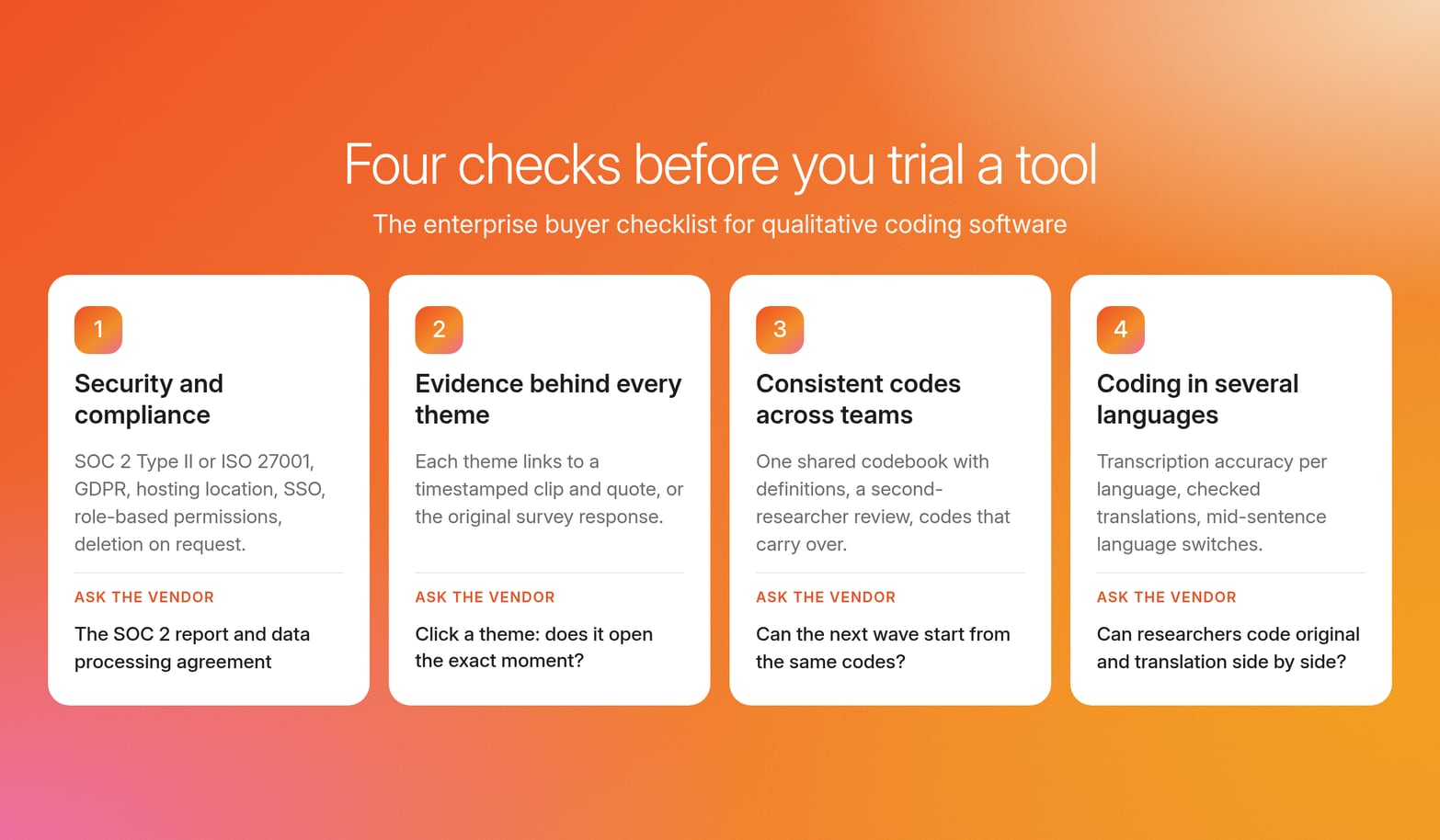
Whichever type of software you go for, there are a few checks it should pass before it’s worth trialing. Here’s what to look for.
1. Security and compliance
Tools that have the proper security certifications and systems in place help prevent costly data breaches and are required by many enterprise legal and IT teams for a platform to even be considered. Check for the following:
SOC 2 Type II or ISO 27001 certification shows an independent auditor has checked how the vendor protects data over a period of months.
GDPR compliance is required whenever you interview participants in the EU, and it covers how their personal data is collected, stored and used.
A clear data hosting location tells your legal team which country participant data and recordings are stored in, which affects which privacy laws apply.
Single sign-on (SSO) lets IT control access through your company’s own login, so people who leave lose access straight away.
Role-based permissions limit who can view recordings, edit the codebook or export data, so sensitive interviews are seen only by the people who need them.
Personal data deletion on request lets you remove a participant’s data when they ask, which GDPR requires.
A change log that records who changed a code or the codebook, and when, is also worth asking about, since it helps you show how a finding was reached. Ask each vendor for its security documentation, such as the SOC 2 report and data processing agreement, before you start a trial.
2. Tracing every theme back to the evidence
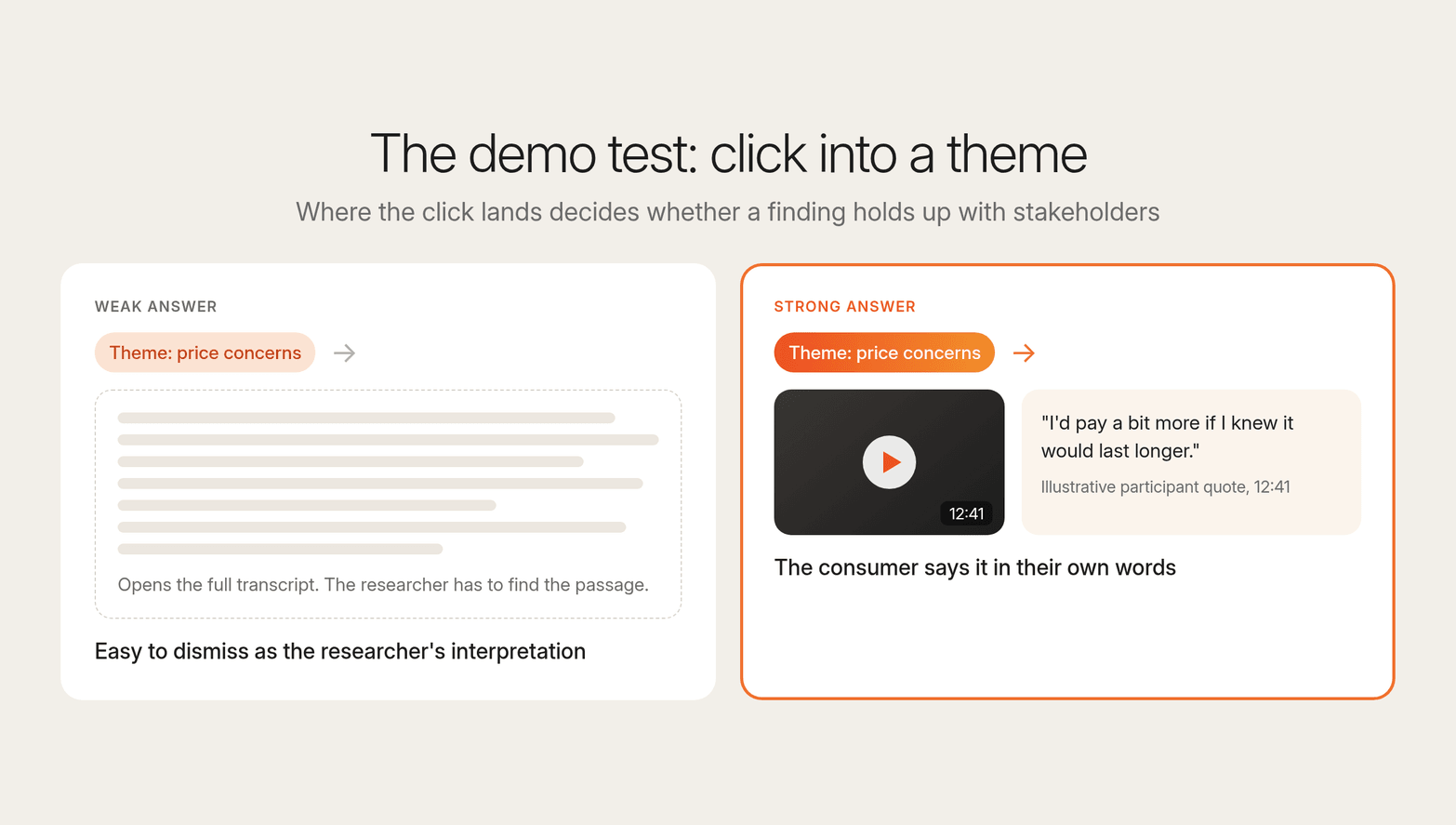
Findings will only stand up if stakeholders can trace them back to the source, especially if they’re being used for high-stakes decisions like validating a campaign. A theme on a slide is easy to dismiss as the researcher’s interpretation. A clip of a consumer saying it in their own words is much harder to argue with.
Make sure the coding platform links every theme to a timestamped video clip and quote, if your primary research is video interviews, and the original response if you’re working from surveys.
During the demo, ask the salesperson to click into a theme and see whether it opens the exact moment in the interview or only the full transcript.
On Conveo, analysis covers speech, tone, and facial cues across every session, and each theme links to the clip behind it.
3. Keeping codes consistent across teams
As coding is inherently subjective, one of the main challenges is keeping codes consistent across teams.
Two researchers can read the same answer and tag it differently, and across several teams the labels drift until “price concerns” in one study means the same thing as “value for money” in another. At that point, you can’t combine results across studies or track whether a theme is growing over time.
Ask vendors:
Can every team work from one shared codebook, with a definition for each code, so new researchers apply codes the same way as the people who wrote them?
Can a second researcher review someone else’s coding and flag disagreements before the findings are final?
Can the codebook carry over to the next study, so a follow-up wave starts from the same codes and the results line up with the last one?
4. Coding research in several languages
If you’re conducting research across different markets, the analysis software needs to code consistently no matter the source language. Consistency helps avoid losing nuance and prevents creating mismatched labels for the same ideas.
Ask vendors:
How accurate is transcription in each language you need? Errors at this stage carry through to every code applied afterward.
Are translations checked by a person or fully automated? Automated translation can miss idioms and sarcasm, which changes what a code means.
What happens when a participant switches languages mid-sentence? This is common in markets like India or Singapore, and some tools drop or garble the switched part.
Can researchers code in the original language and in translation side by side? This lets local researchers check that a code still fits what the participant meant.
Conveo runs interviews in more than 50 languages and applies one code list to every interview in the study, whatever language the participant spoke.
Comparison table: 10 qualitative coding software options
Here’s a closer look at some tools in each qualitative research coding software category. Pricing and compliance details are taken from each vendor’s website as of October 2026.
| Tool | Type | Pricing model | Security and compliance | Best for |
|---|---|---|---|---|
| Conveo | Consumer Understanding Infrastructure (end-to-end) | Custom pricing | SOC 2 Type II and ISO 27001:2022 certified, GDPR compliant, EU hosting in Belgium. SSO and granular access controls | Enterprise consumer insights teams running interviews across studies and markets |
| NVivo | Traditional CAQDAS | Per-user subscription, with student and individual plans. Prices on request or in the online shop | SOC 2 Type II (held by Lumivero, the company behind NVivo, covering its cloud and desktop software). Cloud data hosted in Europe, the US and other regions | Academic and social science researchers who want full control over every code |
| MAXQDA | Traditional CAQDAS | Annual or multi-year licenses for single users or networks, with academic, non-profit, business and student pricing | AI Assist described as GDPR-compliant. Analysis runs on your own computer. Certifications not publicly listed | Researchers who want to work offline, including mixed methods projects that need statistical analysis |
| ATLAS.ti | Traditional CAQDAS | One flat-fee license covering Windows, Mac and web, with multi-user and campus licenses | Data encrypted in transit and at rest. AI processing in the US or Europe. SOC 2 and ISO 27001 not publicly listed | Teams working across different operating systems that want one license for desktop and browser |
| Dedoose | Traditional CAQDAS | Pay per active month: $17.95 individual, $12.95 student, lower per-user rates for groups. Enterprise on request | Project-level encryption and role-based permissions. SSO on Premier and Enterprise plans. Certifications not publicly listed | Researchers and teams whose project work comes and goes, so they pay only in the months they log in |
| QualCoder | Traditional CAQDAS (free) | Free and open source | Runs on your own computer. Optional AI features send data to OpenAI or the free Blablador service | Researchers on a tight budget who want free coding with optional AI |
| Taguette | Traditional CAQDAS (free) | Free and open source | Not publicly listed | Students and small projects that need basic highlight-and-tag coding |
| Delve | AI-assisted coding tool | $50 per user per month for edit access, view-only free, discounted education pricing, 14-day free trial | GDPR compliance, encryption and two-factor login. Hosted in the US. SOC 2 and SSO not publicly listed | Students, academics and small teams that want simple browser-based coding with AI help |
| Marvin | AI-assisted coding tool | Free plan, then Starter, Pro and Enterprise plans priced on request | SOC 2 Type II, ISO 27001, GDPR and HIPAA (add-on). US or EU hosting. SSO | Research teams that want AI analysis with strict compliance controls |
| Dovetail | AI-assisted coding tool | Free plan, then Enterprise with custom pricing | SOC 2 Type II, GDPR and EU hosting. SSO. HIPAA add-on | Product and CX teams bringing interviews, support tickets and feedback into one repository |
When to move from traditional CAQDAS to an end-to-end research platform
Researchers using traditional CAQDAS tools may find themselves looking for alternatives when research volume grows, and the manual work around the analysis makes it harder to deliver findings quickly and consistently.
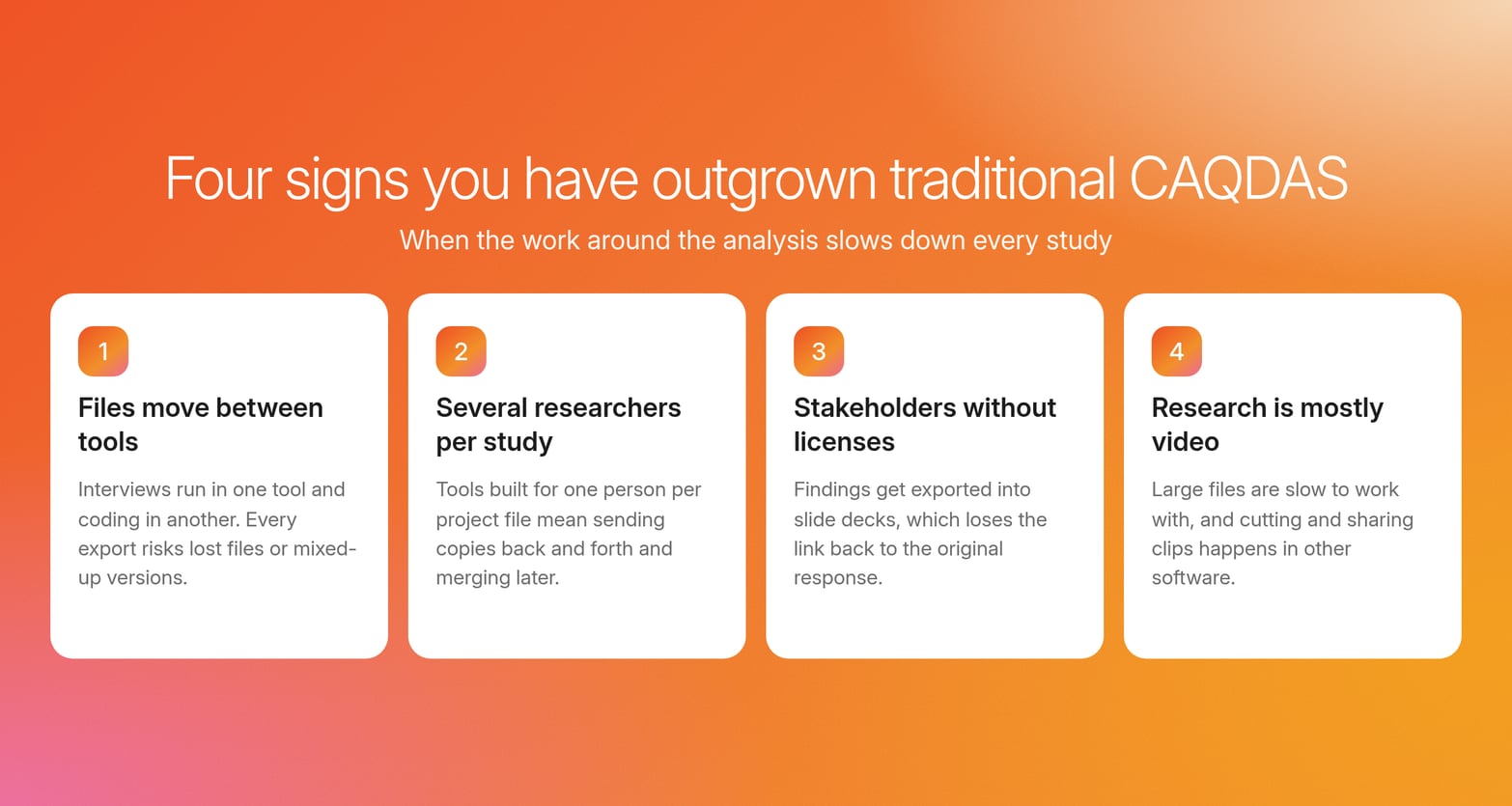
Here are some signs that it’s time to make the switch:
Moving files between tools takes up a big part of every study. Interviews run in one tool and coding happens in another, and every export and import is another chance for files to go missing or versions to get mixed up.
Several researchers need to work on the same study at once. Many traditional tools were built for one person per project file, so sharing work often means sending copies back and forth and merging them later.
Stakeholders want to look at findings without buying a license. Sharing usually means exporting quotes and charts into a slide deck, which loses the link back to the original response.
Most of your research is now on video. Traditional tools can code video, but large files can be slow to work with, and cutting and sharing clips often happens in other software.
If you’re facing these problems on a day-to-day basis, exploring other tools will likely pay off in the long run.
Can you trust AI-assisted coding?
You can trust AI for the first round of coding, as long as a researcher checks the results before they’re used.
AI helps you save time with the slow, repetitive parts of analysis, like applying a codebook across hundreds of interviews or suggesting themes worth a closer look. It’s less reliable at judgment calls, such as comments that could be read more than one way or codes that fit on the surface but miss what the participant meant.
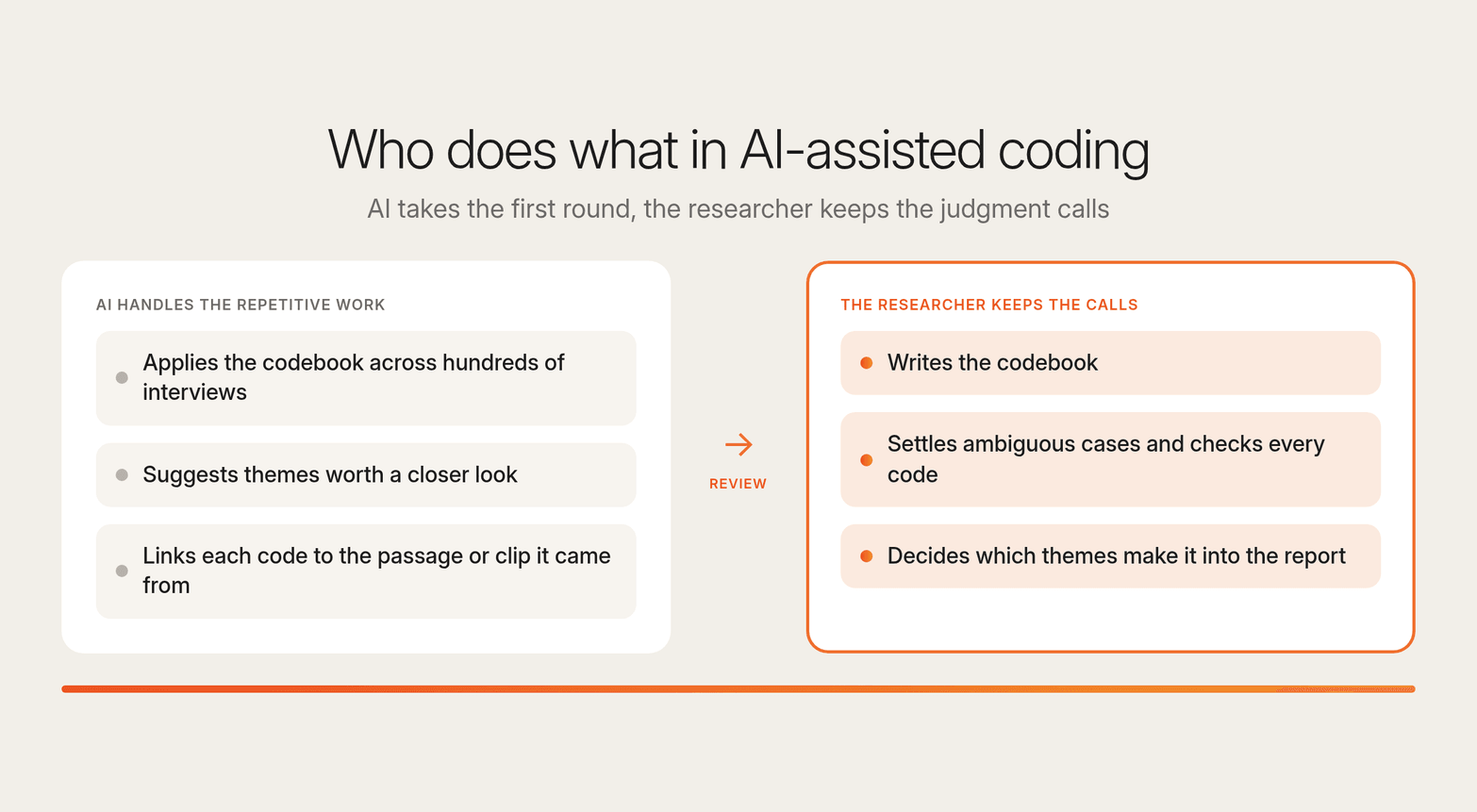
That’s why the researcher still writes the codebook, settles ambiguous cases and decides which themes make it into the report. Use these questions when you demo a tool to see whether its AI coding holds up:
Can researchers review and change every code the AI applies? The researcher should have the final say, so every code needs to be open to checking and editing.
Does each code link to the passage or clip it came from? Researchers can only check AI coding quickly if the evidence is one click away.
Can the AI apply our codebook, or does it only suggest its own themes? Applying your own code definitions keeps results comparable across studies. Suggested themes are useful on top of that, as long as researchers can accept or reject them.
Can a second researcher review the AI coding and record corrections? A log of corrections shows which codes get fixed most often, which usually means their definitions need tightening.
Is our interview data used to train the vendor’s AI models? The answer should be no, confirmed in the contract or data processing agreement, because this often blocks approval at legal review.
By choosing a platform that’s transparent about how its AI works and what it can do, you can feel confident using it to speed up coding while your researchers keep control of what goes into the report.
How Conveo handles qualitative coding at enterprise scale
Coding depends on the steps around it. Who you recruit, how the interviews are run, and how accurately they’re transcribed all shape what ends up in the codebook. When each step happens in a different tool, it’s easy to lose the link between a theme and the person who said it.
Conveo is Consumer Understanding Infrastructure: it recruits participants, runs AI-moderated video and voice interviews, codes them and keeps every study in a searchable insight library. With every step in one place, coding stays consistent across studies and every theme traces back to its source.
Here’s what that looks like for researchers coding interviews on Conveo:
Every analyst codes from the same list. Researchers add their codes as facets, and Conveo applies them across every interview, then carries them into later waves so the next study starts from what earlier ones established. Researchers can review and correct any of the coding.
Topics you didn’t plan for still surface. Talk to Your Data finds topics outside the code list, and any of them can become a new facet in one click.
Themes reflect how people said it. Analysis covers speech, tone and facial cues across every session, and each theme links to the clip it came from.
Multi-market research runs in one place. Interviews run in more than 50 languages, with participants from 8 integrated panel providers or your own contact lists.
Recordings you already have still count. Conveo can analyze interview recordings your team has already collected.
Security review has what it needs. Conveo is SOC 2 Type II and ISO 27001:2022 certified and GDPR compliant, with EU hosting in Belgium, SSO and study data deleted on request.
More than 400 enterprises, including Google, AB InBev and Canva, use Conveo to understand their consumers.
"The pace, responsiveness, and research expertise of the Conveo team, on top of the top AI-moderated qual platform, have been invaluable to us in scaling brand advertising internationally."
Matt Harris, Research & Insights Lead, EMEA, Canva
Frequently asked questions
If we standardize on one qualitative coding tool, how do we make sure codes and themes stay comparable across studies and researchers?
Start with one shared codebook that every researcher works from, with a short definition for each code so it’s applied the same way each time. Add a review step where a second researcher checks a sample of coded passages and flags disagreements before findings are final. Then keep every study in one place, so a code applied to this quarter’s focus group transcripts means the same thing in next year’s follow-up. Without these, teams rebuild the codebook for each project, and themes can’t be tracked from one study to the next.
What should I ask a qualitative coding software vendor about audit trails, permissions, and who changed a codebook?
Ask whether the software logs every change to a code or the codebook, with who made it and when. Ask whether you can limit who edits the codebook separately from who can view or apply codes, and whether you can export the change log for a compliance review. Also check which plan includes these controls, since some vendors keep advanced features like role-based permissions for their higher-priced packages. A clear change log lets you show how a finding was reached if someone questions it.
How do licensing and seat models typically work for qualitative coding software when usage spreads beyond the original project team?
A lot of qualitative coding software is priced per user, per project or through a company-wide contract. Desktop QDA tools have traditionally sold per-user licenses that you download and install on each device, often with discounted university pricing. Browser-based tools usually charge per seat each month. Per-user pricing gets expensive as research spreads, since every new stakeholder needs an extra license. Ask vendors about volume discounts, annual contracts and view-only access for people who only need to read findings. Free tools and open source software options cover basic functionality without license costs, but they rarely include the SSO, admin controls and support an enterprise rollout needs.
Can we migrate our existing projects, codebooks, and memos from our current tool without breaking longitudinal comparisons?
Usually, but check the details first. Ask vendors which file formats they import, whether codes, memos and coded passages come across intact, and how they handle data types beyond text, such as survey data, audio, video and images. Ask whether they support REFI-QDA, an open standard for moving coded projects between QDA tools. Raw research materials like Word documents and transcripts usually move easily. The coding on top of them is what tends to break, so migrate one past study as a test and check that its codes still line up with your current codebook before moving the rest. If you’re moving to Conveo, it can analyze interview recordings you’ve already collected, so earlier interviews aren’t left behind.
Is there free qualitative coding software?
Yes. QualCoder and Taguette are free, open-source tools. QualCoder supports multimedia data and runs on multiple operating systems, while Taguette is a web-based platform with basic coding functionality. RQDA is a plugin for the R programming language, but it hasn’t been maintained since 2021. Free qualitative data coding software suits students and small projects, but it doesn’t list security certifications or offer SSO, which most enterprise IT teams require.
How long does it take to learn qualitative coding software?
The learning curve for qualitative coding software varies among different platforms. Delve allows immediate coding without installation hassles. Feature-heavy desktop tools like NVivo qualitative coding software and ATLAS.ti are built for complex projects and can take days of training. Ask vendors what training and support they offer before you commit.

About the author
Dieter De Mesmaeker
Co-Founder & CEO
Dieter is CEO and co-founder of Conveo. Before starting the company, he founded DataCamp and scaled it into one of the leading edtech platforms in the world.
More by Dieter →Qualitative insights at the speed of your business.
Conveo runs AI-moderated video interviews and structures everything they say.