In this article
TL;DR
Free qualitative data analysis software can be useful for budget conscious teams working on one-off research projects, but they hit limits quickly.
Many free tools only handle text and limit how many people can work on a project, so they get harder to use once video or a wider team is involved.
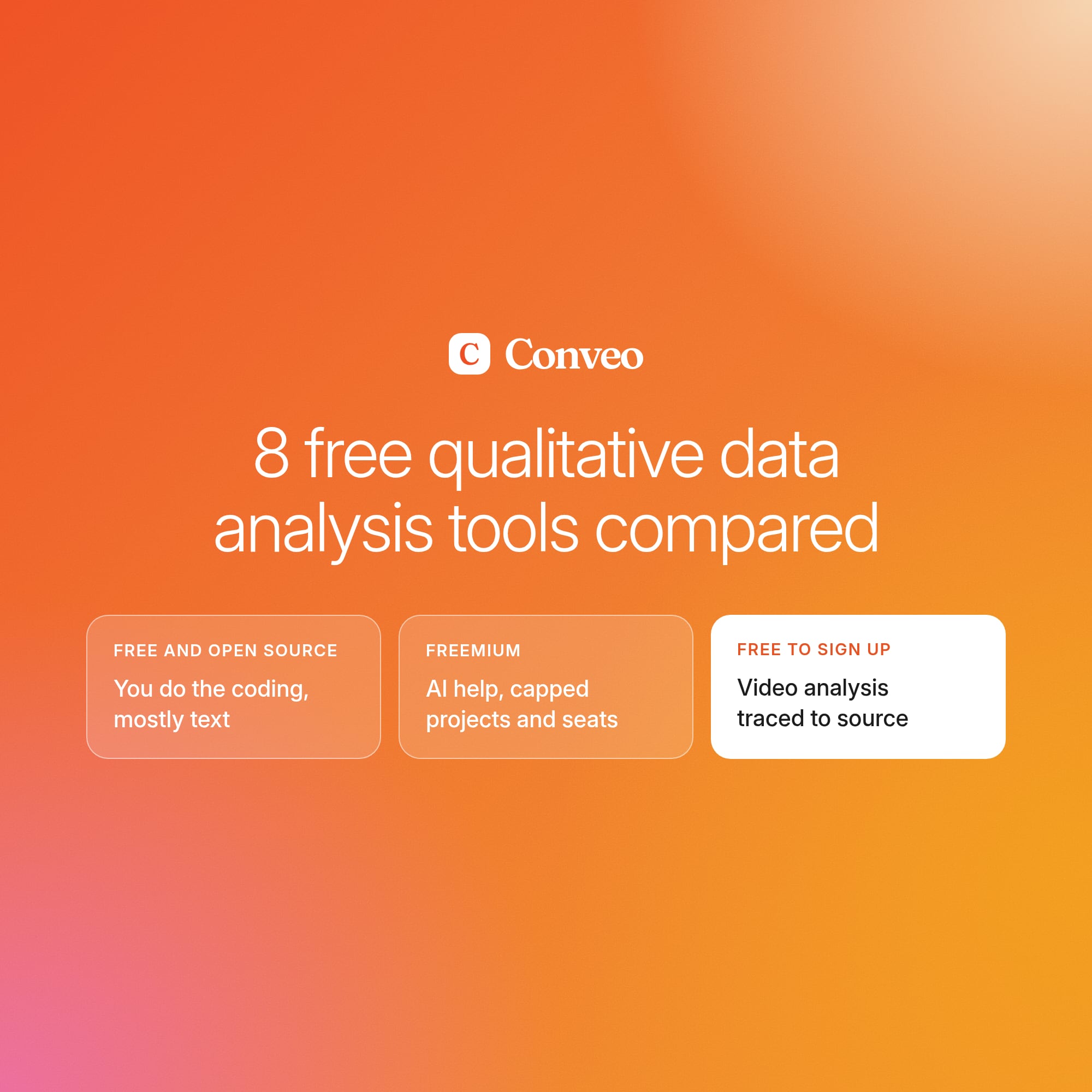
This guide for insights and research teams compares eight analysis tools that are completely free, have free tiers or free sign up options.
For each solution, it explores possible data types, coding capabilities, collaboration features and security.
Conveo fits insights teams at consumer brands that run always-on research and need every finding traced back to the interview behind it. It’s free to sign up.
“Free” qualitative data analysis software comes with very different terms. Some tools are open-source programs you can use without limits, while others are free plans that cap how much you can do or who can use them. Those limits can show up after the coding has already started, when a second study or another colleague needs a place in the project and the free version can’t make room.
This guide compares eight free qualitative data analysis tools on what the free version includes and who each tool suits. By the end, you’ll be clear on whether a free tool is the right choice for your project and which options have the capabilities you need.
What free qualitative data analysis software does
Free qualitative analysis software helps you code consumer interview or survey data into themes so you can understand common patterns in consumer behavior and preferences and use that to make decisions.
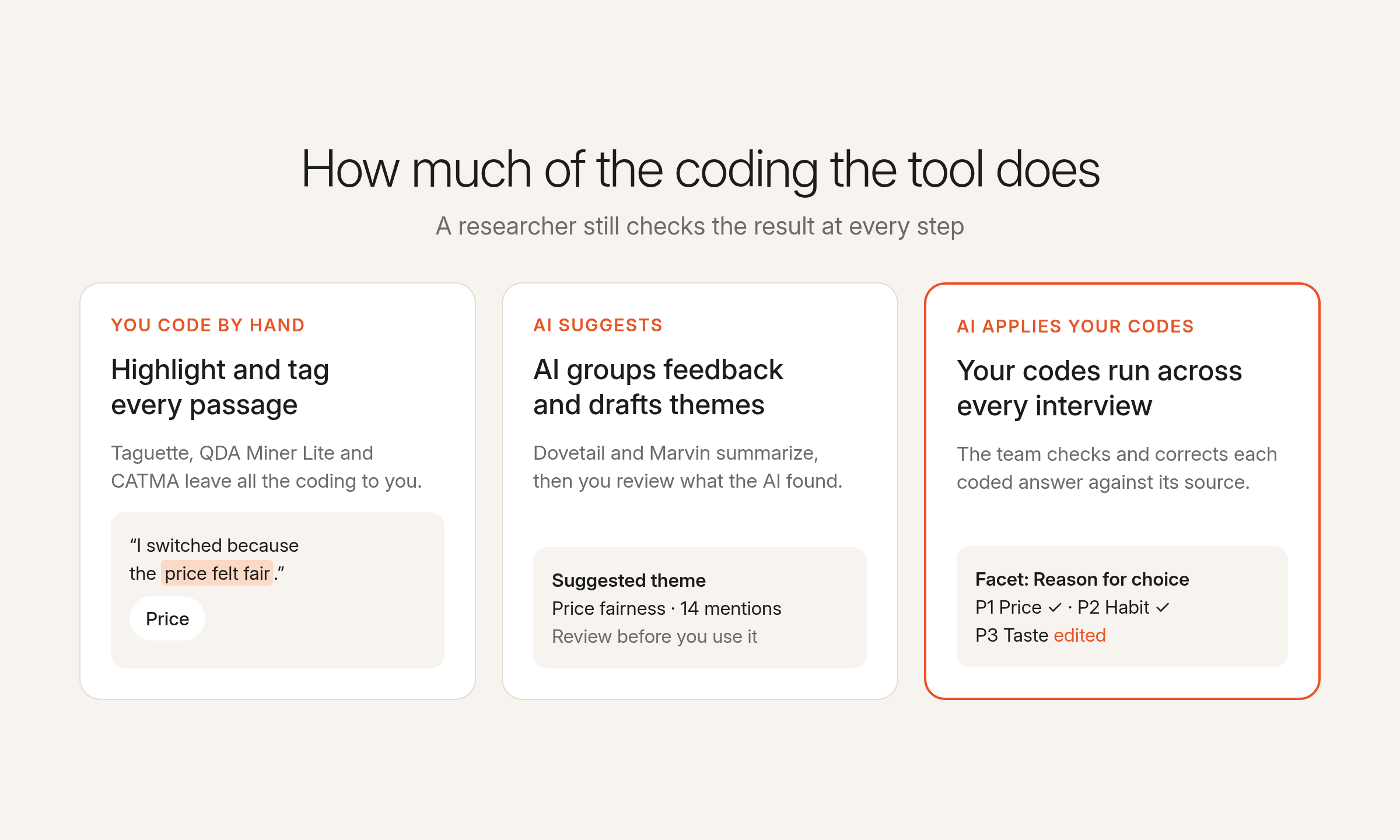
Free tools vary widely in how much of the work of analyzing interview data or survey responses they do for you. In some, you highlight passages and tag them with codes, but the coding is all yours. Others use AI to suggest themes or summarize what came up. That saves time, but a researcher still has to check the results.
Many free tools only work with text. If your interviews are on video, you’ll need to transcribe them first or pick one of the few tools that handle both audio and video.
How to evaluate free qualitative data analysis software for your team
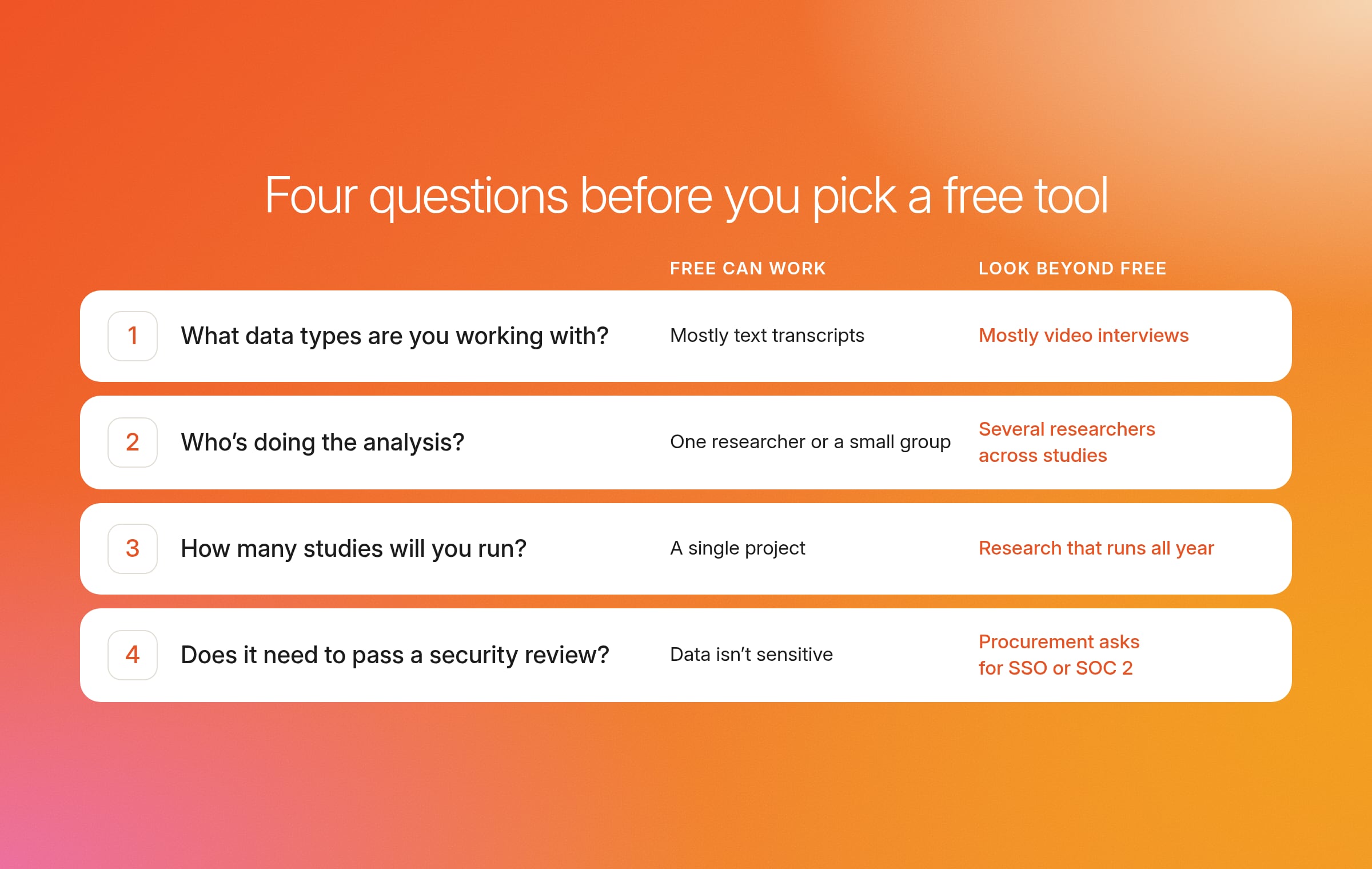
Free qualitative data analysis software can be a helpful tool for teams without much budget wanting to run a small study, but it hits a limit quickly in most other scenarios. Go through these four questions to determine whether a free tool might work for you.
| Question | Free tools can work if… | Look beyond free tools if… |
|---|---|---|
| What data types are you working with? | Your data is mostly text: interview and focus group transcripts, Word documents, or open-ended survey answers. Taguette, QDA Miner Lite, and CATMA support text, and QualCoder also codes audio and video. | Most of your research is video interviews, and you don’t want to code every recording by hand. |
| Who’s doing the analysis? | You’re one researcher who’s happy to code by hand, or a small group sharing a project in Taguette’s hosted version, CATMA, or Dovetail. | Several researchers work across studies at the same time and need one shared place for codes, findings, and clips. |
| How many studies will you run? | It’s a single project, like a one-off consumer study or a university dissertation. Dovetail’s free plan is capped at one project. | Research runs all year, and every new study should build on what earlier ones found. |
| Does it need to pass a security review? | The data isn’t sensitive, and nobody outside the team needs to sign off. Desktop tools also keep files on your own computer. | Procurement asks for SSO, access controls, data redaction, or SOC 2 Type II. Free plans often leave these out. |
If most of your answers land in the right-hand column, you don’t have to commit to a paid tool straight away. Some paid tools offer a free trial or a free sign-up, so you can run a real study on one before anyone signs a contract.
8 free and freemium qualitative data analysis tools compared
If free data analysis software for qualitative research might work for your team, you can compare some of the most popular options using the table below.
| Tool | Free version limits | Data types | How you code the data | Shared projects | Links back to source | Security and compliance | Runs on | Best for |
|---|---|---|---|---|---|---|---|---|
| Taguette | None, fully open source | Text (PDF, Word documents, TXT, HTML) | You highlight passages and tag them by hand | Yes, on the hosted app or your own server | To the coded passage | Not published for the hosted app. The local install keeps files on your computer | Windows, Mac, Linux or browser | Coding interview transcripts on a small project |
| QualCoder | None, but the AI features need your own model key | Text, images, audio, video | You tag passages, images, and clips by hand. Optional AI helps you explore the data | Not published | To the coded passage or clip | Desktop only, so files stay on your computer | Windows, Mac, Linux | Coding audio and video without paying for software |
| QDA Miner Lite | Lite version of QDA Miner, with no AI and no merging projects | Text, images | You build a code tree and tag passages by hand | No | To the coded passage | Desktop only, so files stay on your computer | Windows | Solo researchers on Windows who want structured coding and Excel or Word exports |
| CATMA | None, fully free | Text | You annotate text with your own sets of tags | Yes | To the annotated passage | GDPR rights to access and delete your data. Hosting location not published | Browser | Academic text projects |
| Raven's Eye | Free for non-commercial researchers. Email from a .edu or .org address to get an account | Text, plus transcription of speech in 9 languages | Finds themes in the text automatically | Not published | Not published | Not published | Browser | Non-commercial researchers analyzing open-ended answers |
| Dovetail | 1 project, 1 channel, basic AI, no SSO or access controls | Calls, documents, surveys | AI groups related feedback and summarizes it | Comments and mentions | Every AI insight links back to its source | SOC 2 Type II, GDPR. SSO and access controls only on Enterprise | Browser | Trying AI-assisted analysis on one project |
| Marvin | 2 full seats, single-project analysis, no thematic analysis or PII redaction | Call recordings via its AI notetaker, uploaded files, CSV | AI writes notes on each file or call, and you clip key moments. Thematic analysis is on paid plans | 2 full seats, no viewer seats | Each AI note is tagged to the moment it came from | SOC 2 Type II, GDPR, Google and Microsoft SSO | Browser | Recording and analyzing calls for one project |
| Conveo | Free to sign up with $50 in credits and 3 pre-loaded studies to explore. | Video and voice interviews run in Conveo, plus interview recordings you upload | AI applies your codes across every interview, and researchers check and correct the results | Yes, with SSO and access controls | Each theme links to the participants behind it, with video clips and quotes stakeholders can audit. | SOC 2 Type II and ISO 27001:2022 certified, GDPR compliant | Browser | Insights teams at consumer brands that run always-on research |
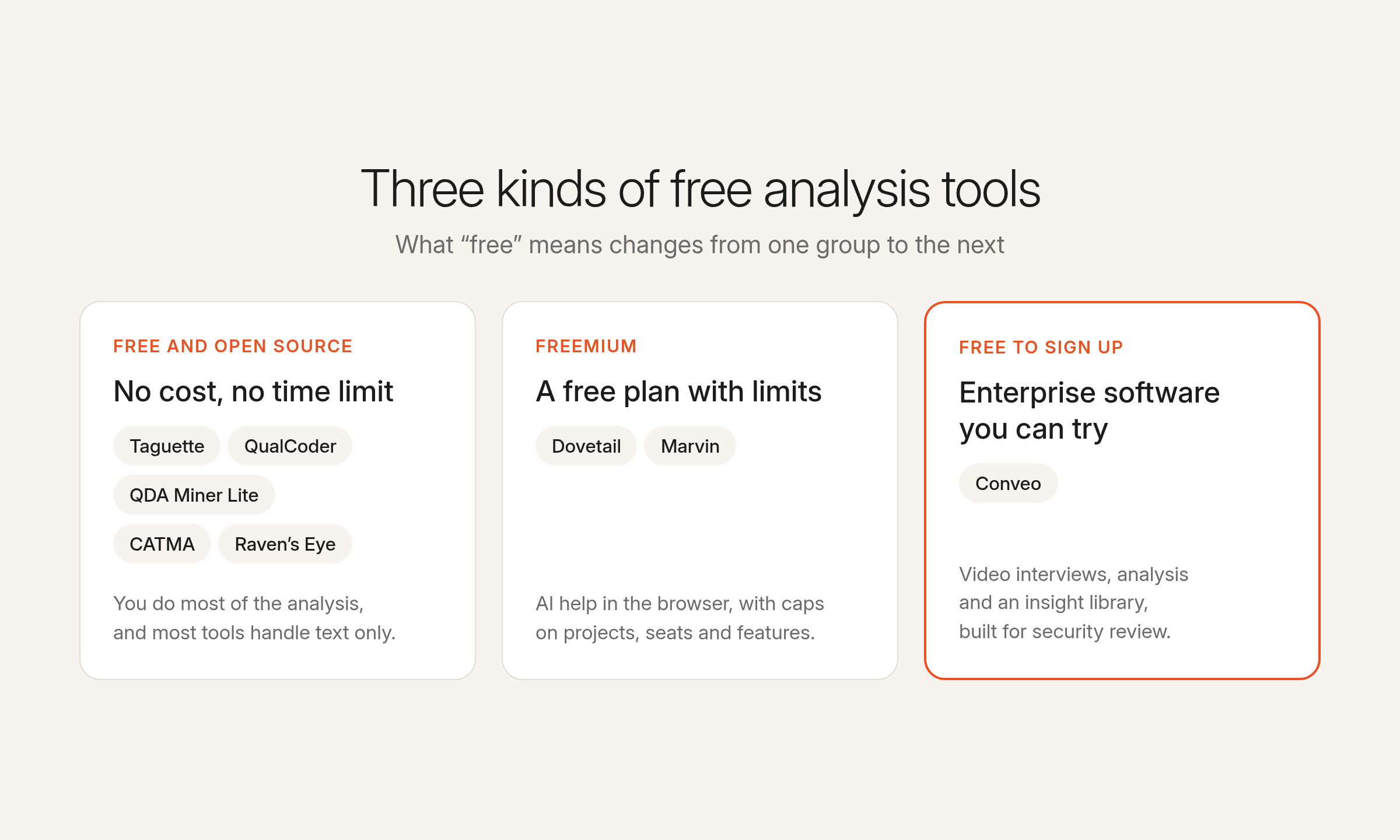
These tools can be split down further into free and open source tools that you download or use in a browser at no cost, freemium platforms with a free plan and paid upgrades, and enterprise-grade software that’s free to sign up.
Free and open-source tools
These tools cost nothing to use. You do most of the analysis yourself, and most handle text only. They suit individual researchers, students, and academic projects where the data doesn’t need to pass a security review.
1. Taguette
Taguette is an open-source qualitative data analysis program for highlighting and tagging text. You can run it on your own computer or use the hosted app in your browser if you want to share a project with others. It’s about as simple as QDA software gets: you upload transcripts or Word documents, highlight a passage, and give it a tag.
Where it works well: Small projects where you want to code interviews quickly. You can set different permission levels for collaborators on the hosted app, which few free tools offer.
Where it falls short: It only handles text, and all coding is manual. Taguette doesn’t publish security details for its hosted app, so teams with sensitive data will want the local version, which keeps files on their own computer.
Best for: Coding interview transcripts on a small project.
2. QualCoder
QualCoder is open-source desktop software and the main free option if your research includes recordings. You can code text, images, audio, and video in one project, and reports show how different coders tagged the same data. If you want AI help exploring your data, you can connect your own OpenAI key or a free academic service.
Where it works well: Mixed data types in one project, especially interviews you want to code straight from the recording.
Where it falls short: Audio and video need VLC installed alongside it, and there’s no published way to work on the same project with others at the same time.
Best for: Coding audio and video without paying for software.
3. QDA Miner Lite
QDA Miner Lite is a free, cut-down version of Provalis Research’s paid QDA Miner, for coding text and images by hand. You build a code tree, add memos, and use Boolean search to pull up every passage coded a certain way. Code frequency charts show which themes came up most, and you can export tables to Excel or Word when it’s time to present the qualitative data.
Where it works well: Structured coding of text and images, with export options for reporting. It can also import projects from ATLAS.ti, and your projects can move into the paid QDA Miner if you outgrow the free version.
Where it falls short: It runs on Windows only, with no AI and no collaboration.
Best for: Solo researchers on Windows who want structured coding and Excel or Word exports.
4. CATMA
CATMA is a free annotation tool that runs in the browser. Most of its users are humanities scholars working on literary and other texts. You annotate text with your own sets of tags, then explore the results as word clouds and distribution graphs.
Where it works well: Group projects. Several people can annotate the same text, which suits university seminars and research teams.
Where it falls short: It’s built around text analysis for academic research, so it doesn’t fit consumer interviews as naturally. It gives users GDPR rights over their data but doesn’t say where it’s hosted.
Best for: Academic text projects shared with a group.
5. Raven’s Eye
Raven’s Eye takes a different approach from the other free tools: it finds themes in text automatically, so you don’t code anything by hand. It also transcribes speech in nine languages and analyzes text in 55 more. It’s free for researchers who don’t make money from their results, and you sign up by emailing from a .edu or .org address.
Where it works well: Large volumes of open-ended survey answers, where coding by hand would take too long.
Where it falls short: Commercial users have to contact Raven’s Eye for pricing, and it doesn’t publish any security details.
Best for: Non-commercial researchers analyzing open-ended survey answers.
Freemium platforms with paid tiers
These platforms give you part of a paid product for free, usually with AI help and a browser-based interface. The free plan is a way to try the platform on a real project before paying, so expect limits on projects, seats, and advanced features.
6. Dovetail
Dovetail is a customer intelligence platform that pulls calls, documents, and surveys into one place and uses AI to make sense of them. Its free plan is aimed at individuals and needs no credit card. You get one project, AI that groups related feedback and summarizes it, highlight reels, and comments and mentions so others can weigh in. Every AI insight links back to its source, so you can check where a finding came from.
Where it works well: Getting AI-assisted analysis on a single project without paying anything. Dovetail holds SOC 2 Type II and GDPR compliance at the company level, and its traceability is one of its strongest features.
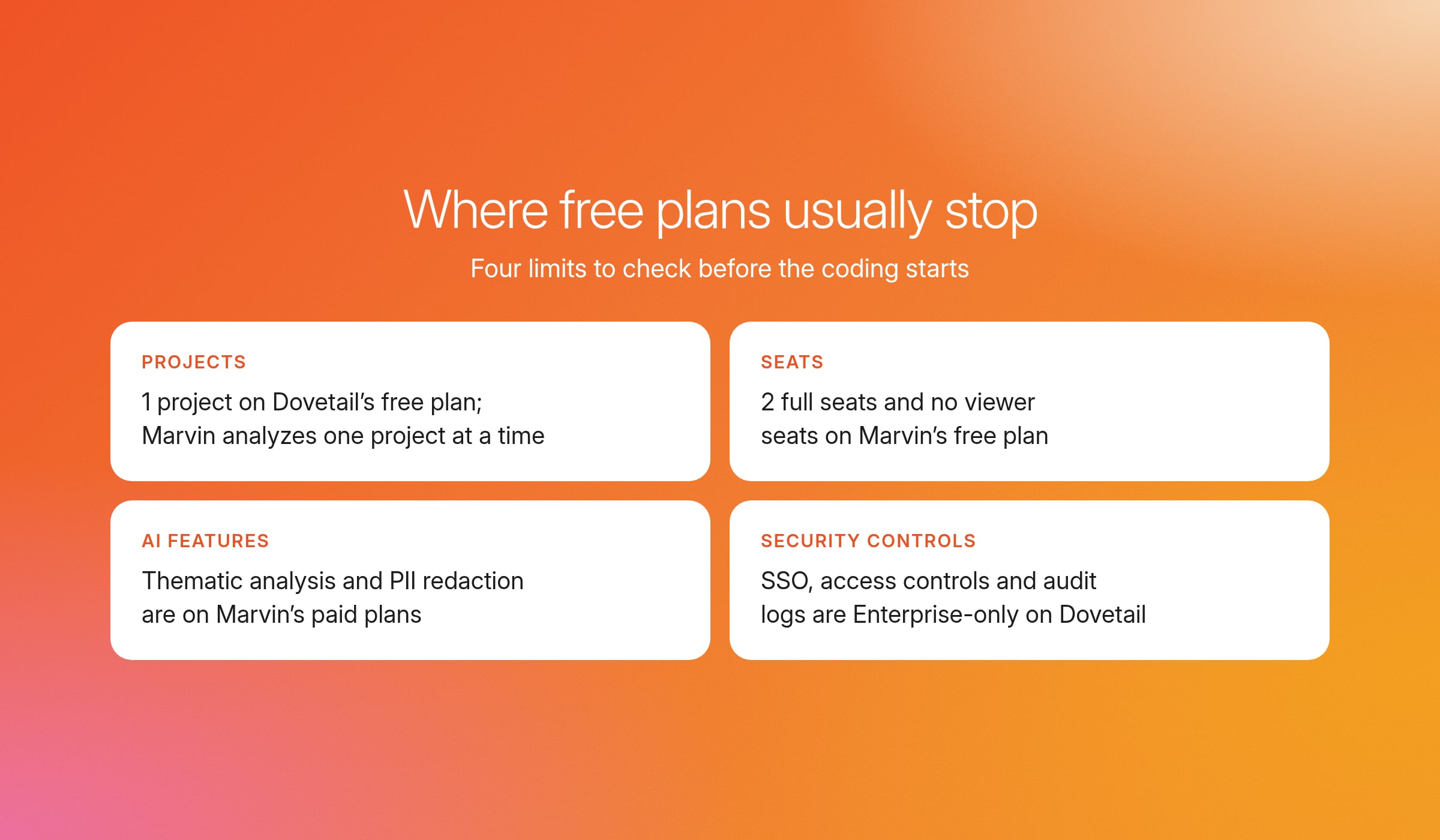
Where it falls short: The free plan is capped at one project, one channel, and one dashboard, and AI chat only works within that project. SSO, access controls, data redaction, and audit logs are Enterprise-only.
Best for: Individuals trying AI-assisted analysis on one project before deciding on Enterprise.
7. Marvin
Marvin is an AI-native customer feedback repository built around recorded calls. On the free plan, its AI notetaker joins your Zoom, Meet or Teams calls to transcribe, take notes, and summarize. It also writes notes on uploaded files, and each note is tagged to the moment it came from. You can clip key moments into video clips and take notes with a colleague during live sessions.
Where it works well: Turning calls into searchable notes and clips straight away. The free plan includes SOC 2 Type II, GDPR compliance, and Google or Microsoft SSO, which is more secure than most free plans offer.
Where it falls short: The free plan has 2 full seats and no viewer seats, so stakeholders can’t look at the work without a seat. Analysis covers one project at a time, and thematic analysis, PII redaction, and Marvin’s Deep Research analysis are on paid plans only. Paid plan prices aren’t published.
Best for: Small teams recording and analyzing calls for one project.
Enterprise-grade platforms
Teams that run qualitative market research continuously usually outgrow free tools. Enterprise-grade software covers other parts of the research workflow on top of analysis, and some options are free to sign up.
8. Conveo
Conveo is Consumer Understanding Infrastructure with a free sign-up option. It runs AI-moderated video and voice interviews, analyzes them, and keeps every study in a searchable insight library so the team can build on earlier findings. Teams can also upload interviews they've already recorded and analyze them the same way.
Conveo sets up codes, called facets, from your questions and objectives, and researchers can also add their own. It applies them across every interview, and the team checks and corrects the results.
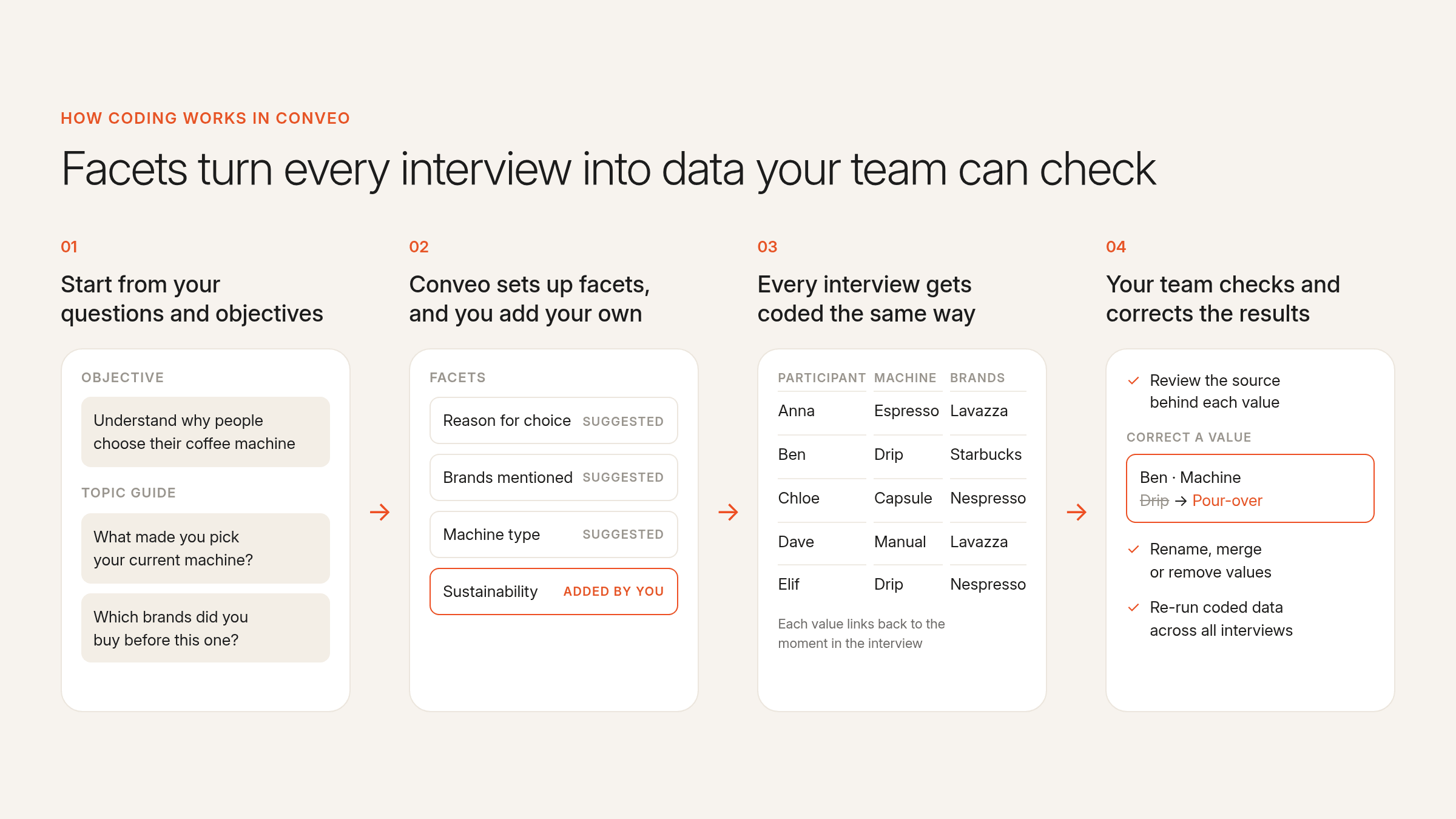
On video, multimodal analysis reads what people say, how they say it, and what’s on camera, including tone, hesitation, facial expressions, and brands visible in the room. Every cue links to its moment in the recording, and emotion charts show how reactions change from question to question.
To dig further, Talk to Your Data lets you ask study questions in plain language. It answers with the quotes and the participants behind them, and it groups people who describe the same idea in different words.
Where it works well: Each theme links to the participants behind it, with video clips and quotes stakeholders can audit. Conveo is SOC 2 Type II and ISO 27001:2022 certified, GDPR compliant, with EU hosting in Belgium, plus SSO and access controls.
Where it falls short: Conveo is built for consumer interviews, so a text-only project like coding documents or literature is better served by a free CAQDAS tool.
Best for: Insights and CMI leads at consumer brands who want to bring their research into one system and get it through security review.
What enterprise teams need instead
Free tools can work for a single study, but enterprise teams that run qualitative consumer research continuously tend to hit the same problems.
Coding every interview manually takes time, and video has to be transcribed and clipped in other software. The results arrive slowly, sometimes after the decision has been made. And most free plans don’t have the security features that enterprises need.
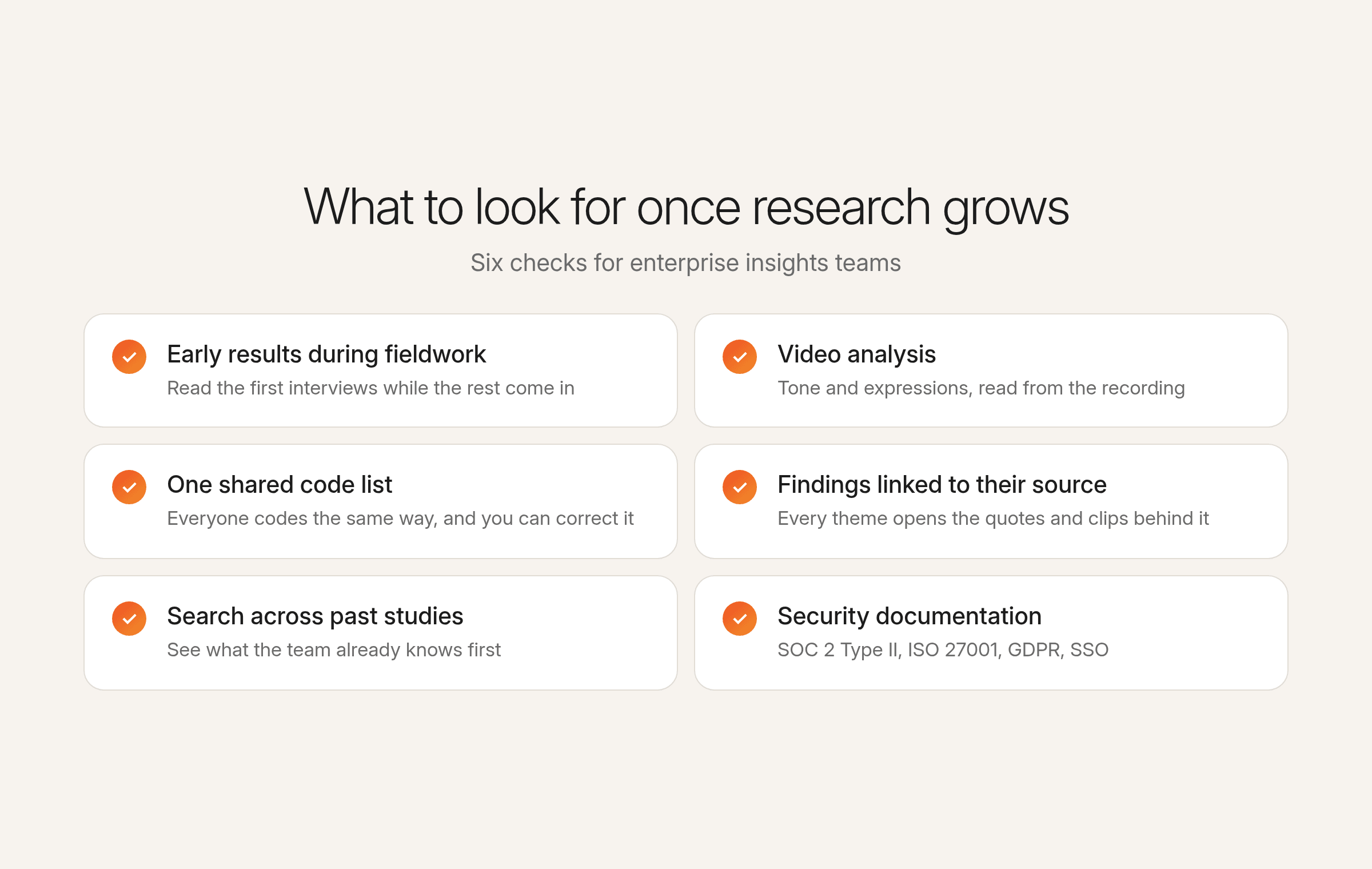
These are the things to look for in a tool that fixes those problems:
Early results during fieldwork. You should be able to look at the first interviews while the rest are still coming in, so you don’t have to wait until everything is coded.
Video analysis. The tool should analyze recordings directly, including tone of voice and facial expressions, so you don’t have to transcribe and clip them in other software.
One shared code list. Everyone on the team should be able to easily code with the same list, and you can check and correct what the tool has coded.
Findings linked to their source. Each theme should link to the quotes and clips it came from, so anyone can check where a finding came from.
Search across past studies. You need to be able to search earlier studies, not only the current one, so you can see what the team already knows before starting a new project.
Security documentation. SOC 2 Type II and ISO 27001 certification, GDPR compliance, a clear hosting location, SSO, access controls and data deletion on request are the standard for many enterprises.
Free analysis tools with basic functionality can feel like a quick and easy way to get started, but if your research is going to grow, you’ll probably end up switching to another tool anyway. It’s easier to start with one that covers what you need, and the best qualitative data analysis software for enterprise teams covers all of the above.
Try Conveo’s analysis for free and see how you can consolidate your research stack
More than 400 enterprises, including Google, Unilever, AB InBev and Canva, use Conveo to understand their consumers. As Matt Harris, Research & Insights Lead, EMEA at Canva, explains:
"The pace, responsiveness, and research expertise of the Conveo team, on top of the top AI-moderated qual platform, have been invaluable to us in scaling brand advertising internationally."
Matt Harris, Research & Insights Lead, EMEA, Canva
For a small text-only project with no budget, a free tool like Taguette or QualCoder will do the job. For anything bigger, you can sign up to Conveo for free and get $50 in credits and three pre-loaded studies, so you can see how the analysis works on real interviews before you commit, or you can book a demo.
Frequently asked questions
Is there free qualitative data analysis software?
Yes. Several tools offer software for qualitative data analysis free of charge. Some are open-source programs you download and install, some run online in a browser, and some paid platforms have a free plan with limits on projects or seats. Before installation, check which operating systems the tool supports, and look on its website to see whether the free version allows commercial use.
Is QDA software hard to learn?
It depends on the tool. Simple tools that cover the basic functions, like highlighting text and adding a basic code, can take under an hour to pick up. Full desktop packages with more menus and analysis options have a steeper learning curve and can take several days. If you need something user-friendly, try it on a few real transcripts before you commit.
Can you use a spreadsheet for qualitative data analysis?
Yes, for small projects. You paste quotes into rows, add a column for each code and filter to compare answers. It gets hard to manage on complex projects with many interviews or codes that change partway through, and a spreadsheet can’t link a quote back to the recording.
Can QDA software handle quantitative data and mixed methods projects?
Some can. Several QDA tools let you attach demographic or survey data to each participant, so you can compare how different groups talked about a theme. For statistical analysis, you’ll usually export the coded data to other tools. Conveo can also ask rating and multiple-choice questions inside the interview, so the quantitative answer and the reason behind it come from the same person.
Is free QDA software safe for sensitive data?
Desktop programs keep files on your own computer, so data doesn’t go to anyone else’s server. Hosted versions of free tools often don’t say where data is stored or how it’s protected. Open-source tools also vary in how actively they’re developed, so check for regular updates before you rely on one for sensitive qualitative research.
Can AI code qualitative data for you?
AI can suggest themes, apply your codes across interviews and summarize what came up, which saves time on large studies. AI working from transcripts alone can miss sarcasm or hesitation, so a researcher should still check the coding before findings go into a report.

About the author
Meg Gerli
Research Impact Lead
Meg is a Research Impact Lead at Conveo, working with insights and research teams on the studies they run with Conveo.
Meet Meg on film →Qualitative insights at the speed of your business.
Conveo runs AI-moderated video interviews and structures everything they say.